01 / Overview
Desktopy
Grow and customise plants that live on your desktop in a relaxed tycoon game with minigames and progression.
- Tools
- Unity, C++
- Duration
- Approximately 9 weeks
- When
- Around February 2025
Quick proof
- Context
- Grow and customise plants that live on your desktop in a relaxed tycoon game with minigames and progression.
- Role
- Team Lead, Main Programmer, Game Designer
- Key contributions
- I built most of the game within the team, taking on programming, interface work and desktop integration.
- Outcome
- The playable version received positive feedback. Development is currently on hold.
See the project
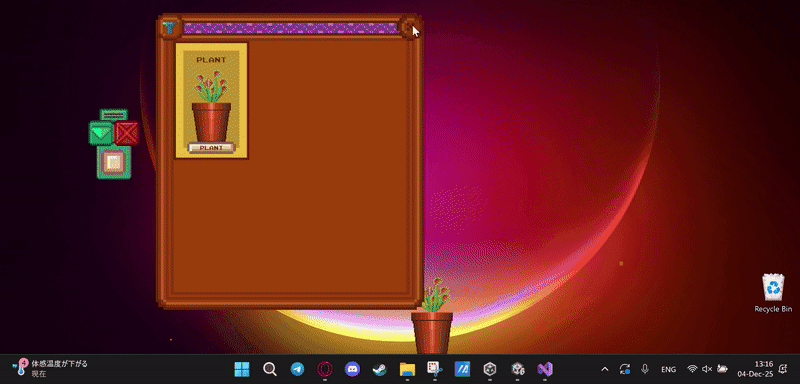
Desktopy's overlay demonstrated on a Windows desktop.
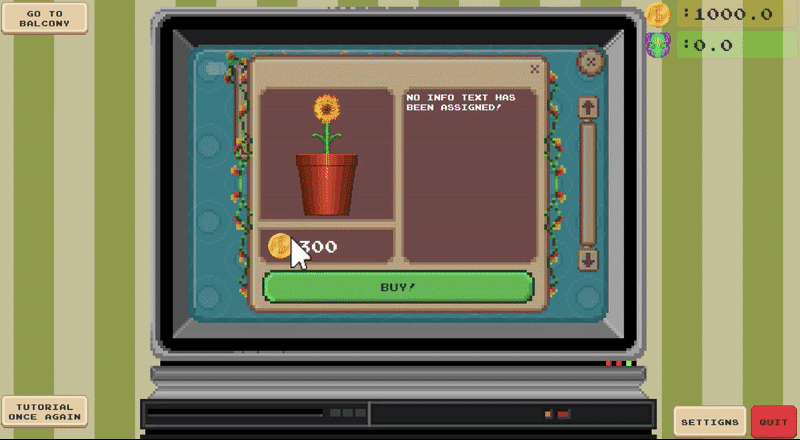
A plant purchase screen inside Desktopy's retro computer interface.

A green-text minigame in Desktopy's retro computer interface.

An item draw interface within Desktopy.
Details
Why?
The aim was to combine a relaxed experience with the satisfaction of growing a collection, while giving players a way to personalise their desktop. Desktopy was intended to feel like a chill activity that could sit alongside everyday computer use.
Another motivation was the possibility of publishing Desktopy on Steam and monetising it. Our planned strategy was to earn revenue from Steam item-market transaction fees when players sold their plant skins.
What?
Desktopy is a plant-based tycoon game with minigames and customisation. Players buy and upgrade plants, collect cosmetic skins, and place plants on their Windows desktop, where they can interact with them outside the main game view.
Its progression uses two in-game currencies. Players earn the first through minigames or by exchanging the second currency for it, then spend it on plants and upgrades. Plants produce the second currency over time; that currency can also be used in a gambling-style activity to obtain plant skins.
The playable version includes one minigame in addition to the skin activity. More content and Steam market items were planned for the full version.
How?
The implementation uses Unity for two modes: the full game and a stripped-down desktop mode that retains the plants and their physics. A separate C++ application manages the launched Unity instance for overlay control. The stripped-down mode was intended to reduce the workload from the rest of the game.
My work covered much of the gameplay programming and interface implementation, together with the desktop integration. I completed the desktop-mode work within a day and found that part straightforward. The wider development also involved changing from an initial 3D direction to a 2D game.